

Blog
When Disk Capacity Becomes a Business Risk: Lessons from Toyota’s 2023 Production Outage
In 2023, insufficient disk space during routine maintenance contributed to the shutdown of Toyota’s production-order system and eventually led to the suspension of all 28 production lines across its 14 domestic plants in Japan. The incident is a useful reminder that capacity is not just an infrastructure metric: it can become a business risk.
Key Takeaways
- A capacity issue can extend far beyond the affected system, disrupting critical business operations.
- Monitoring “is the system up?” is not enough; teams also need visibility into the resources the system depends on.
- Capacity monitoring can provide early warning before resource exhaustion affects critical services.
- MetricsHub can help monitor infrastructure capacity and make these signals available in observability platforms such as Prometheus and Grafana.
Introduction
What does it take to stop 28 production lines across 14 automotive plants? In Toyota’s case, it was not a cyberattack. The incident began with a much more ordinary problem: a maintenance operation ran out of the disk space it needed to complete its work.
That contrast is what makes the incident worth looking at. Disk capacity is easy to treat as a routine system metric. But when a critical application depends on that capacity, a small technical constraint can quickly become an operational problem.
When Routine Maintenance Becomes a Production Problem
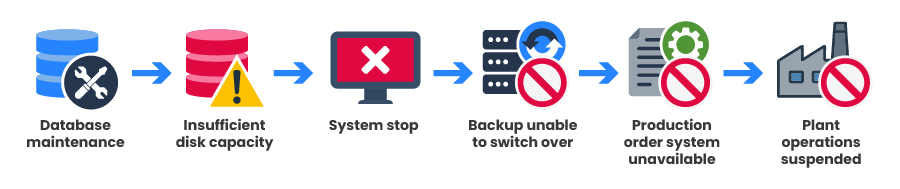
On August 27, 2023, Toyota performed regular maintenance on its production-order system. According to the company’s official explanation, data that had accumulated in a database was being deleted and reorganized. During the procedure, an error occurred because the available disk space was insufficient, and the system stopped.
Toyota’s own wording is direct: “an error occurred due to insufficient disk space, causing the system to stop.” The company later confirmed that the malfunction affected multiple servers that process parts orders.
The backup function did not save the situation. Toyota reported that the affected servers were running on the same system, so a similar failure also affected the backup function and the switchover could not be completed. The production-order system became unavailable, and the impact moved from IT to manufacturing.
By the evening shift of August 29, operations had been suspended on all 28 production lines across Toyota’s 14 domestic plants. Toyota restored the system after transferring the data to a server with greater capacity on August 29, and plant operations resumed the following day.
Why Capacity Problems Are Easy to Underestimate
Capacity problems rarely look dramatic at first. A system can continue to operate normally while its available capacity gradually decreases. Nothing is technically “down,” yet the headroom available for additional data, an unexpected workload, or a maintenance operation keeps shrinking.
This is the difference between availability and headroom. Availability answers: “Is the system working now?” Capacity monitoring asks another question: “How close are we to a limit, and is that situation getting worse?”
Toyota did not disclose the exact storage resource involved in the incident. What the incident clearly shows, however, is how quickly a capacity issue can become a business-critical problem.
Monitoring Capacity in Practice
Capacity issues can affect different parts of an infrastructure, depending on the system and the workload. What matters is not only how much of a resource is currently being used, but also how much capacity remains and how quickly that margin is changing.
A single percentage can be useful, but it does not tell the whole story.
| Signal | What it tells us |
|---|---|
| Used capacity | How much of a resource is already consumed. |
| Available capacity | How much room remains for normal operations and unexpected workloads. |
| Utilization | How close a resource is to its limit. |
| Trend over time | Whether the situation is stable or moving toward a critical threshold. |
The trend is especially important. A resource that remains stable at a relatively high utilization may be less urgent than one that is consuming its remaining capacity very quickly.
Effective capacity monitoring requires context, not just a red or green status.
How Does MetricsHub Help Monitor Capacity?
MetricsHub collects infrastructure metrics from monitored systems and exports them using OpenTelemetry, following OpenTelemetry semantic conventions. Depending on the monitored platform and connector, these metrics can provide visibility into the utilization and remaining capacity of different infrastructure resources.
The collected metrics can be sent to Prometheus and visualized in Grafana, making it easier to follow capacity trends over time and identify resources that are approaching their limits.
Turning Capacity Metrics into Actionable Insights
Metrics become more useful when they are observed in context. For filesystems, the MetricsHub System Performance dashboard can show current utilization and free capacity alongside growth rate and estimated time to saturation. This makes it easier to identify filesystems that may require attention before they become critical.
To show what this looks like in practice, the following MetricsHub example focuses on filesystem capacity — one concrete type of infrastructure resource that can be monitored over time.
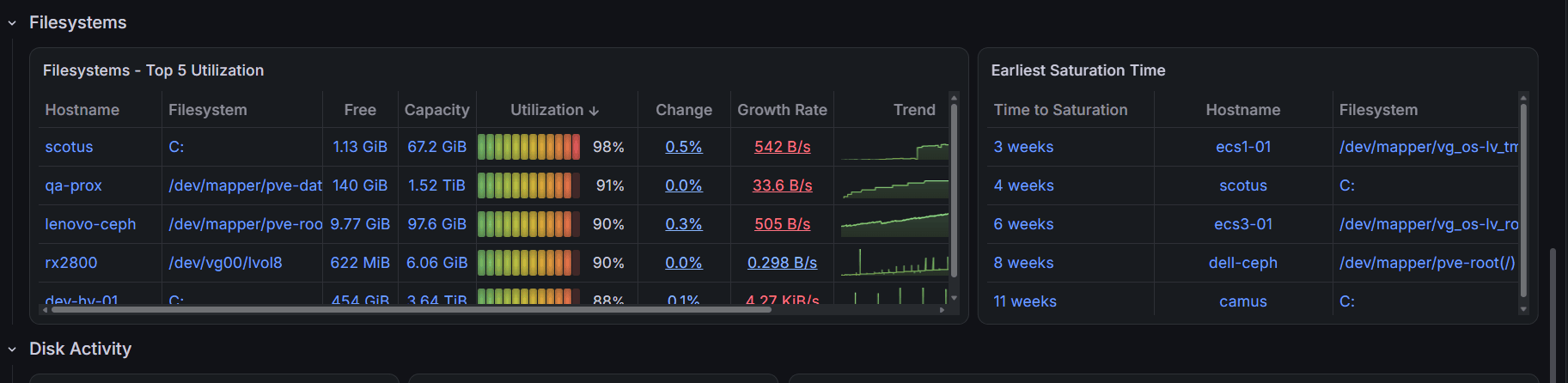
Figure 1 – Example of the MetricsHub System Performance dashboard showing filesystem utilization, free capacity, growth rate, and estimated time to saturation.
In this example, some monitored filesystems are already above 90% utilization, while the Earliest Saturation Time panel shows estimated saturation times of only a few weeks for some of them.
From Visibility to Action
MetricsHub provides alert rules for infrastructure monitoring, including conditions related to high filesystem utilization. These rules are evaluated by Prometheus; when an alert fires, Prometheus sends it to Alertmanager for routing and notification.
The example below shows warning and critical alerts for monitored filesystems with high utilization, together with the corresponding host and storage device.
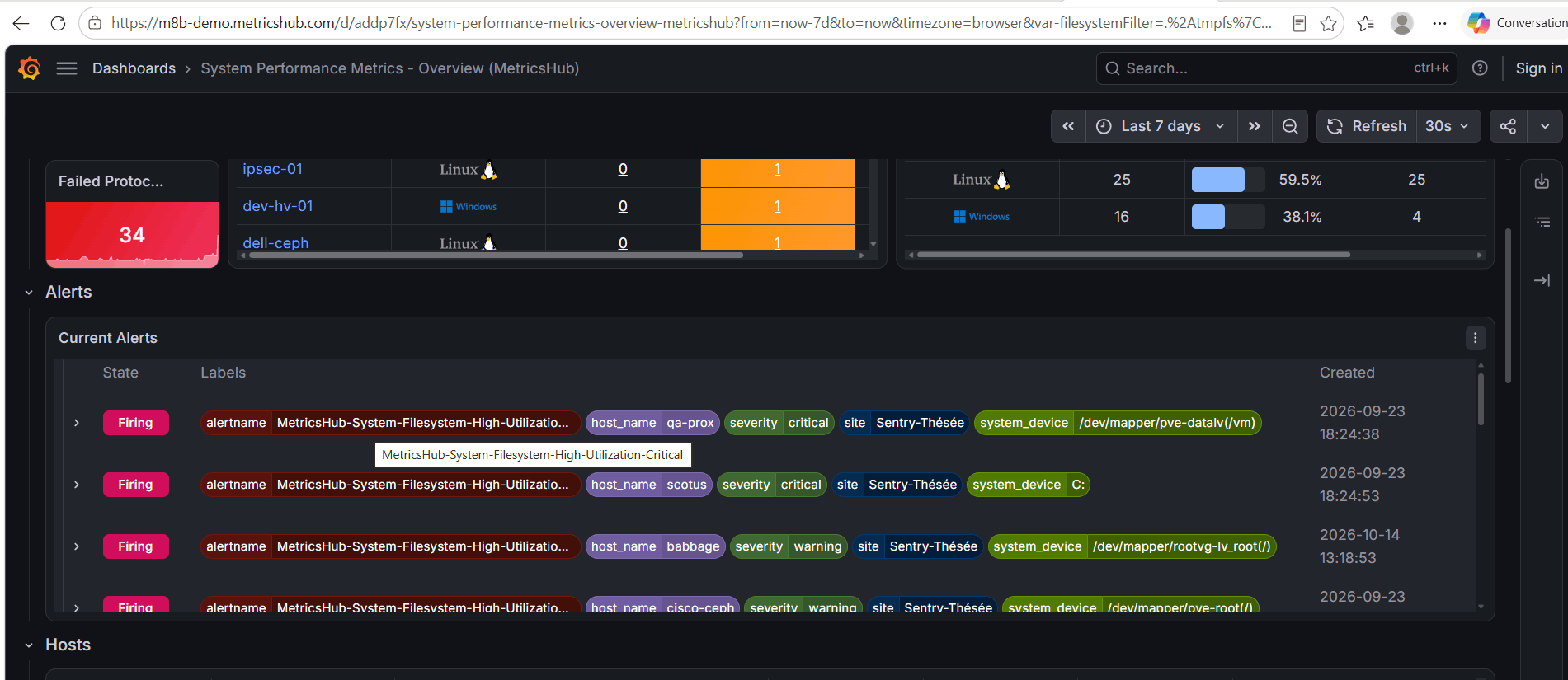
Figure 2 – Example of the MetricsHub System Overview showing active high-utilization alerts for monitored filesystems.
Appropriate alert thresholds depend on the environment and workload. What matters most is receiving the alert while there is still time to investigate the cause, increase capacity, reduce resource consumption, or take another corrective action.
Key Lessons
Toyota’s 2023 incident shows how quickly a capacity constraint can move beyond IT and affect critical business operations.
Capacity monitoring is not only about knowing whether a resource has already reached its limit. It is also about understanding how much margin remains and whether that margin is shrinking.
MetricsHub helps bring this visibility into existing observability workflows by collecting infrastructure metrics and making them available to platforms such as Prometheus and Grafana.
Sometimes, the first sign of a future outage is not an error message. It is simply a capacity trend moving in the wrong direction.
Additional Resources
- Toyota Motor Corporation - Concerning the production order system malfunction (Sep. 6, 2023)
- Toyota Motor Corporation - Scheduled Resumption of Operations at Domestic Plants (Aug. 29, 2023)
- MetricsHub Documentation - Prometheus Integration
- MetricsHub Pre-built Dashboards for Grafana
What to Remember
Toyota’s 2023 outage shows how insufficient disk capacity can disrupt critical business operations. Monitoring remaining capacity and growth trends helps teams act before resources run out. MetricsHub brings these signals into Prometheus and Grafana to support timely investigation and corrective action.