AI Agent Integration
You can configure AI assistants like Claude or ChatGPT to interact in real time with MetricsHub's internal knowledge and tools.
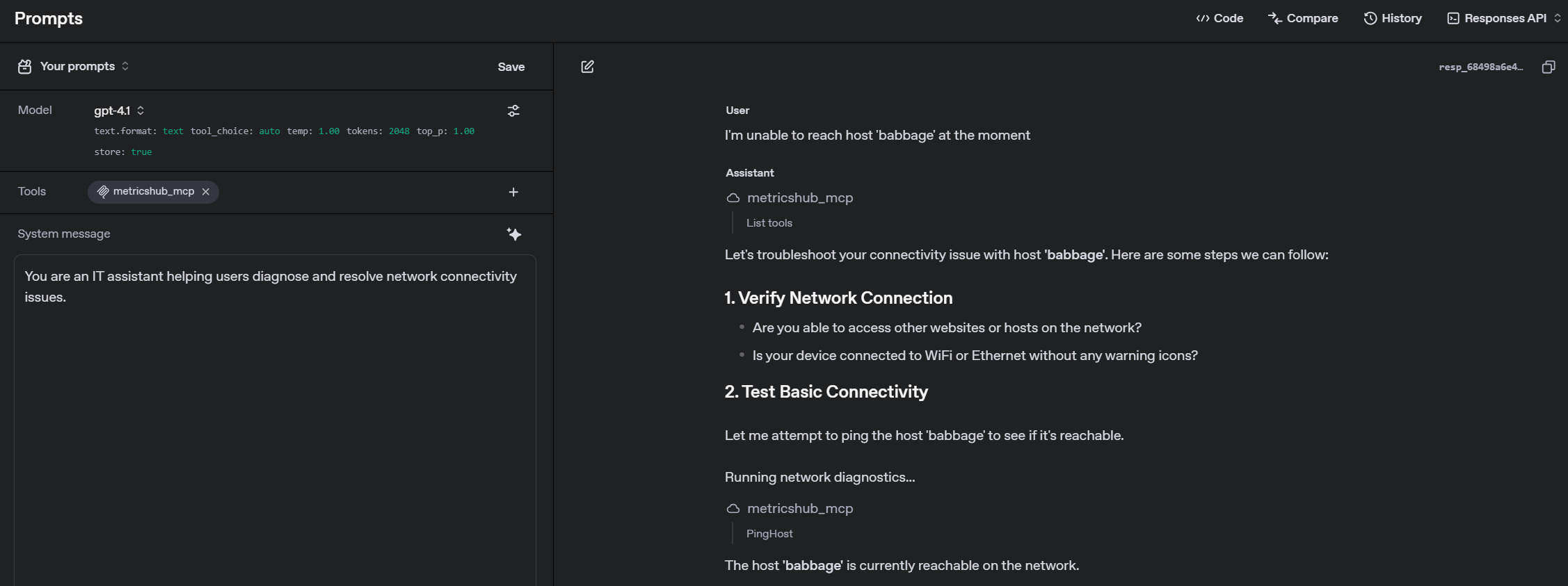
The following tools are currently available:
| Tool Name | Parameters | Description |
|---|---|---|
CheckProtocol |
| Determines if the specified hosts are accessible using a given protocol. Supported protocols include: http, ipmi, jdbc, jmx, snmp, snmpv3, ssh, wbem, winrm, and wmi. |
CollectMetricsForHost |
| Fetch and collect metrics for the specified hosts using the configured protocols and credentials, and the applicable MetricsHub connectors (MIB2, Linux, Windows, Dell, RedFish, etc.) |
GetAgentInfo | No parameters. | Retrieves MetricsHub Agent metadata, runtime information and license details. |
GetHostDetails |
| Fetch, for the given hosts, the configured protocols used to check their reachability, the connectors successfully detected as working, and the collectors available to perform requests on the hosts. |
GetMetricsFromCacheForHost |
| Retrieve metrics from the cache for the specified hosts |
ListConnectors | No parameters. | Lists all connectors supported by MetricsHub including their identifiers and information. |
ListHosts | No parameters. | Retrieves all configured hosts (Resources) in the MetricsHub Agent instance for which we will be able to execute MetricsHub connectors and collect metrics. |
PingHost |
| Checks if one or more hosts are reachable via ping and returns their response time and status. |
TestAvailableConnectorsForHost |
| Test all applicable MetricsHub connectors (MIB2, Linux, Windows, Dell, RedFish, etc.) against the specified hosts using the configured credentials and return the list of connectors that work with these hosts. |
To get started, simply connect your AI assistant to the MetricsHub MCP Server using the Model Context Protocol (MCP). Once the connection is established, the available tools will be automatically published and ready for use.
Prerequisites
Before configuring the AI agents integration, make sure that:
- your AI assistant supports MCP
- MetricsHub is installed and running
- you have network access to the machine where MetricsHub is running
- the
31888port is accessible from your machine or MCP client - you have generated an API key to authenticate against the MetricsHub MCP Server.
Important: Some MCP clients require HTTPS with a valid TLS certificate. If so, keep HTTPS enabled on your MetricsHub instance and ensure the client trusts the SSL certificate (see Updating the SSL certificate). If you use a reverse proxy, forward requests to the MetricsHub MCP Server on port
31888.
Configuring the integration
Configure your AI assistant to connect to https://HOSTNAME:31888/mcp. Make sure to replace HOSTNAME with the actual hostname or IP address of the machine where MetricsHub is running.
Each request to the MetricsHub MCP Server must include the API key in the Authorization header as follows:
Authorization: Bearer YOUR_API_KEY
Using the MCP tools
Once the connection is established, your AI assistant can call the PingHost tool as follows:
{
  "method": "tools/call",
  "params": {
    "name": "PingHost",
    "arguments": {
      "arg0": ["server-01", "server-02"]
    }
  }
}
The command will return this type of response:
{
  "hosts": [
    {
      "hostname": "server-01",
      "response": {
        "hostname": "server-01",
        "responseTime": 27,
        "reachable": true
      }
    },
    {
      "hostname": "server-02",
      "response": {
        "hostname": "server-02",
        "responseTime": 42,
        "reachable": false,
        "errorMessage": "Timed out"
      }
    }
  ]
}
Connector and protocol tools
Besides the tools above, which are part of the product, MetricsHub exposes the tools declared by the loaded protocol extensions and connectors. They follow the configuration: a reload that adds or removes a connector or an extension updates the tool list of the MCP server and notifies the connected AI assistants.
| Tool name | Declared by |
|---|---|
<extension>_<tool> | A protocol extension, for the ad-hoc operations its protocol supports on a host (run a command, run a query, read a log, etc.). |
<connector>_<tool> | A connector, under its tools: section: its sources and computes run on the host and the table of one source is returned. |
Every such tool takes a hostname list (required), the parameters the tool declares, and an optional poolSize. The result lists one entry per host, holding either the response of a protocol tool, the columns and rows of a connector tool, or an error.
A connector that declares variables (such as LinuxProcess or LinuxService) is resolved for each resource, so its tools are exposed under its own identifier, with the default values of its variables, and under the identifier of each additional connector that uses it, e.g. myApache_<tool> for:
    additionalConnectors:
      myApache:
        uses: LinuxService
        variables:
          serviceNames: httpd
On each host, such a tool runs with the variables of the host's resource. If the variables of a resource give the tool another description, other parameters or another destructive flag than those advertised to the AI assistant (taken from the first resource that has the tool), the tool is refused on that resource's hosts with an error, rather than run differently from what the assistant was told.
Every argument is checked before the tool runs, and an invalid one is returned as an error without contacting any host:
- An
integer,numberorbooleanparameter only accepts a value of that type (5,5.0and5e0are the same integer, but the string"5"is not one). - A text parameter of a connector tool that declares neither a list of values nor a regular expression only accepts letters, digits and
_ . @ : -, starting with a letter, a digit or_:sshd.service,db-01.example.com,10.0.0.1. Spaces, quotes,;,$,/and a leading-are refused, so that a value cannot break out of the command, query or request it is inserted into. - A connector may restrict a parameter to a list of values (
enum), advertised in the tool's JSON schema, or to a regular expression (pattern), given in the parameter's description. - No argument may contain
%{or${, since MetricsHub expands its credential macros and references after inserting the arguments. In a shell command passed tossh_runCommand, write$VARrather than${VAR}.
How a connector declares a tool is described in the connector developer guide.
Tools that change the state of a host, such as a reboot, are declared with destructive: true. Their description is prefixed with DESTRUCTIVE: and the MetricsHub Agent's own MCP server and chat advertise them only when the agent runs with the JVM flag -Dmetricshub.mcp.tool.destructive.enabled=true. MetricsHub Central receives every tool and applies its own policy (enabled in the UI, authorized user, manual approval).
Connector tools
The Connector Tools page lists the tools declared by the connectors, with the advertised name of each tool (<connector>_<tool>), its parameters and what it does. Each connector page of the Connectors Directory details the tools of the connector, with their full description and the type, default value and possible values of their parameters. Both are generated from the connectors of this version.
A connector's tools are exposed only when the connector is loaded, and run on the hosts the connector was detected on. Their output is returned as is: an assistant can narrow it with the parameters, and when the host or the account cannot run a tool (missing command, missing privilege), most tools return the error as a row rather than an empty table.
Commands that need root privileges on Linux and UNIX use sudo when the host's configuration enables it (useSudo and useSudoCommands); the connector lists them under sudoCommands.
Protocol tools
The protocol extensions shipped with MetricsHub declare the following tools. Each takes the hostname list (required), an optional timeout in seconds (default: the host's configured timeout) and an optional poolSize, in addition to the parameters below. The tools marked destructive are exposed by the MetricsHub Agent's own MCP server and chat only when it runs with the metricshub.mcp.tool.destructive.enabled JVM flag; MetricsHub Central receives them whatever the flag and applies its own policy.
| Tool Name | Parameters | Description |
|---|---|---|
ssh_runCommand (destructive) | commandLine (string, required) | Runs a shell command through SSH and returns its output. |
wmi_wql | query (string, required), namespace (string, optional, default: the configured namespace) | Runs a WQL query through WMI and returns a text table. |
wmi_runCommand (destructive) | commandLine (string, required) | Runs a Windows command (CMD) through WMI. |
winrm_wql | query (string, required), namespace (string, optional) | Runs a WQL query through WinRM and returns a text table. |
winrm_runCommand (destructive) | commandLine (string, required) | Runs a Windows command (CMD) through WinRM. |
winrm_readFile | path (string, required) | Reads a file through WinRM. |
winrm_listFiles | pattern (string, required) | Lists the files matching a path pattern through WinRM. |
wbem_wql | query (string, required), namespace (string, optional) | Runs a WQL query on a WBEM (SMI-S, CIM) host and returns a text table. |
ipmi_sensors | None | Reads the chassis status, the FRUs and the sensors. |
ipmi_sel | since (string, optional: 30m, 1h, 2d or seconds) | Reads the System Event Log as CSV, whole or since a duration. |
ipmi_chassisStatus | None | Reads the power state of the chassis. |
ipmi_chassisAction (destructive) | action (string, required: on, off, cycle, reset, soft, diag or identify), seconds (string, optional, for identify) | Powers the chassis on or off, cycles or resets it, requests a soft shutdown or a diagnostic interrupt, or lights the identify LED. |
ipmi_raw (destructive) | netFn (string, required), command (string, required), data (string, optional) | Sends one raw IPMI command and returns completionCode;data in hex. |
snmp_get, snmpv3_get | oid (string, required) | SNMP GET of one OID. |
snmp_getNext, snmpv3_getNext | oid (string, required) | SNMP GETNEXT. |
snmp_walk, snmpv3_walk | oid (string, required) | Walks an SNMP subtree. |
snmp_table, snmpv3_table | oid (string, required), columns (string, required: comma-separated column numbers, ID for the row index) | Reads an SNMP table and returns the selected columns as a text table. |
jmx_fetchMBean | objectName (string, required), attributes (string, optional, comma-separated), keyProperties (string, optional, comma-separated) | Reads attributes of the MBeans matching an object name pattern and returns a text table. |
http_get | path (string, optional, default: /), header (string, optional), resultContent (string, optional: body, header, http_status or all) | Sends an HTTP GET request with the host's configured HTTP settings and credentials. |
http_request (destructive) | method (string, required), path, header, body, resultContent (strings, optional) | Sends an HTTP request of any method with the host's configured HTTP settings and credentials. |
jdbc_query (destructive) | query (string, required) | Runs an SQL statement with the host's configured JDBC settings and returns a text table. |